
Off Course
Instructional Design
User Research
UX/UI Design
Design Thinking
Informal learning platform that curates resources for readers to learn more about the context (e.g., science, history, culture) of a novel.

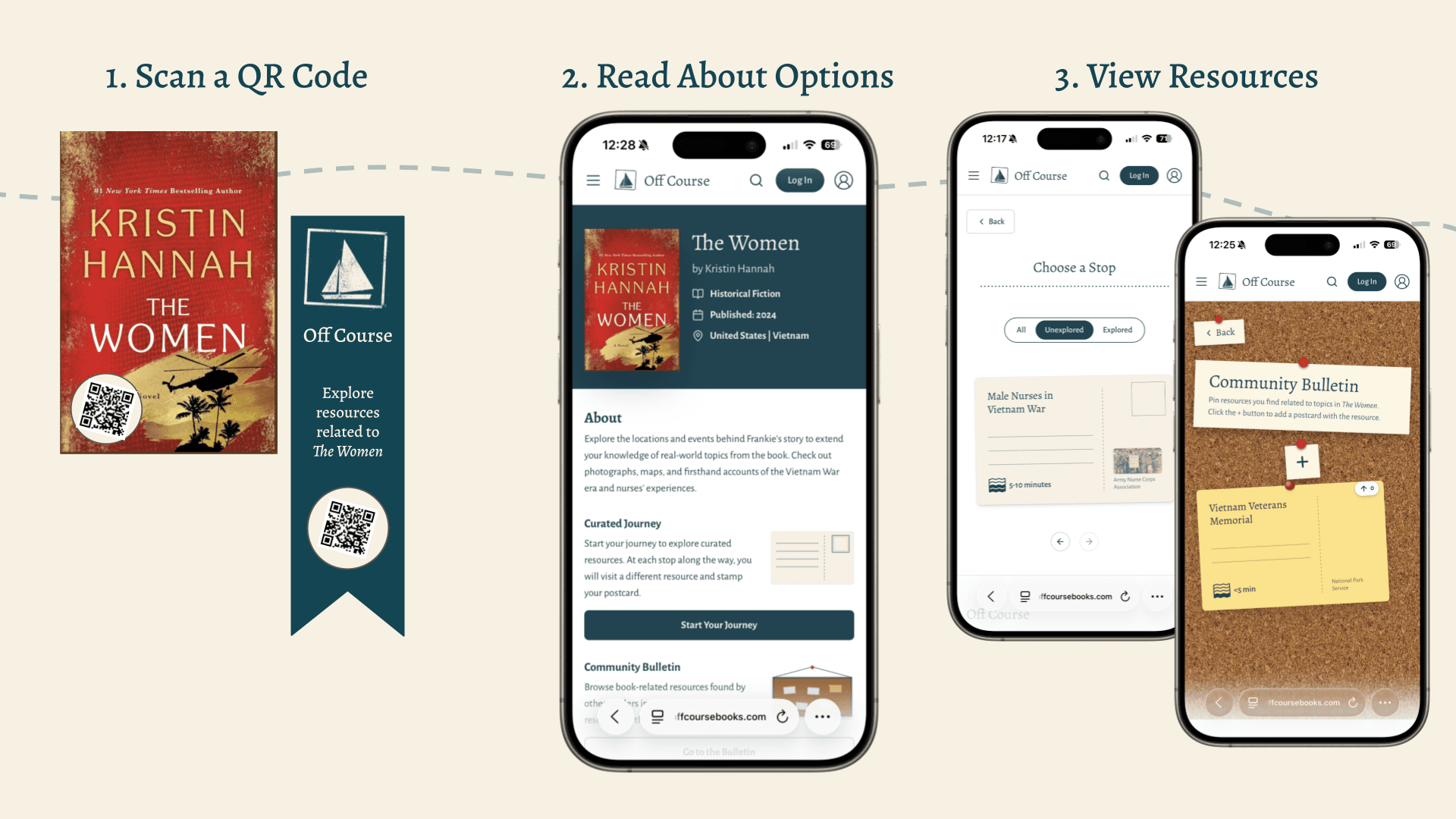
Off Course is a website that surfaces internet resources for curious readers to learn more about the context of a book and connect more meaningfully with the books they read. The website can be accessed via a QR code printed on book covers/bookmarks or a link in e-readers that brings readers directly to the associated book page and allows them to quickly engage with their own curiosity. Book pages provide a central location where readers can explore a set of curated resources or share resources they find on the community bulletin.
Process

I applied design thinking to iterate a human-centered design and I used several theories to inform content delivery, including the Information Gap Theory, Inquiry-Based Learning, and Constructivism.
Overview
Features
Direct link to the website through QR code or link in e-reader that readers can go to when they choose.
Central location with curated and community-selected resources reducing search time.
Human-curated resources related to unique and prominent topics from books.
Community bulletin with upvote system for validating content.
Multiple levels of resource depth/time estimates.
Defining the Problem through User Research

Opportunity
While reading novels, I was always curious to look up more about different topics I came across but often found it required too much effort to locate what I was interested in learning. I saw this as an opportunity to make a wider platform for readers to easily learn more about topics related to books they read. However, I first wanted to determine if others had similar experiences while reading and how a platform should be structured to meet this need.
User Research
I conducted the following market research to explore this idea:
Initial environmental scan to understand what reading-related products exist that help readers connect with books.
Interviews with target audience of highly curious readers and empathy mapping with the data to identify behaviors, attitudes, preferences.
Second environmental scan to explore reading-based apps and websites either mentioned in interviews or aligned to ideas shared during interviews.
Surveys to gather quantitative data on audience habits such as the type of content they are looking for and how long they spend looking at content.
Problem
The research revealed users had the following pain points:
Limited time to locate relevant resources.
Curiosity is lost when there is too much effort required to satisfy it (e.g., downloading app, multiple searches).
Overemphasis of AI and Wikipedia in searches making it hard to identify accurate content.
Varied reader preferences for resource length and type.
This data was distilled into a problem statement:
How might we reduce the friction for curious readers to learn more about the context (e.g., science, history, culture) of a novel?
"I think it's very easy to find information on the internet now. I think what's more challenging is discerning what sources you're looking at, and some of them are more reader-friendly than others."

Interview Participant
Design Iteration

The data from user research led to the decision to create a website with curated content.
I sketched several approaches to designing a website to address this problem, including different methods of curating content.
I received conflicting feedback from users on how they wanted content structured, such as providing different sections based on the depth of a resource, highlighting a few of the "best" resources, or aligning resources to book chapters. I went back through the user research to align my design to the main user needs.
I designed "postcards" to fit with the website’s theme of traveling “off course” which contained resource descriptions, the linked resource, and an indicator for the resource length. The postcards provided a simple structure to make resource selection digestible for users while increasing engagement.
Usability Testing:
I went through various iterations of the postcard design as this was a point of confusion in usability tests. Users were unsure where to click to access the resource. They also wanted to have choices of resources without being overwhelmed by too many options. Therefore, I tried multiple methods of displaying the postcards to increase clarity and choice while reducing cognitive load.
Final Design
The following images highlight several website pages across the user flow and a video demonstrating how users navigate to resources.


